

AC triac LED dimmer 220V 230V 110V Push Button Switch Rail Controller dimmer Suitable for Light Bulb TR1(TR1 and R11 Set)
Product details
| Management number | 218632651 | Release Date | 2026/05/03 | List Price | $48.31 | Model Number | 218632651 | ||
|---|---|---|---|---|---|---|---|---|---|
| Category | |||||||||
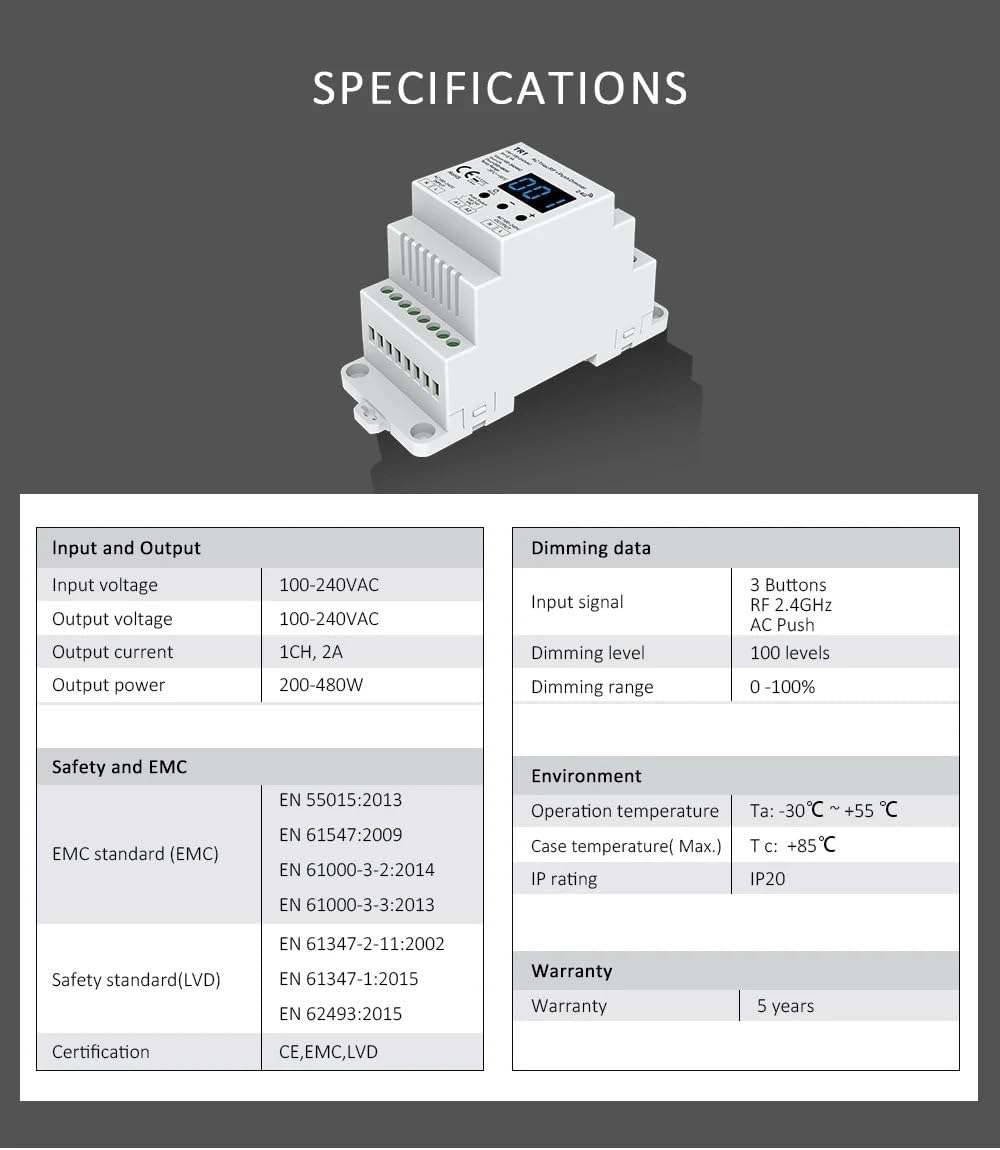
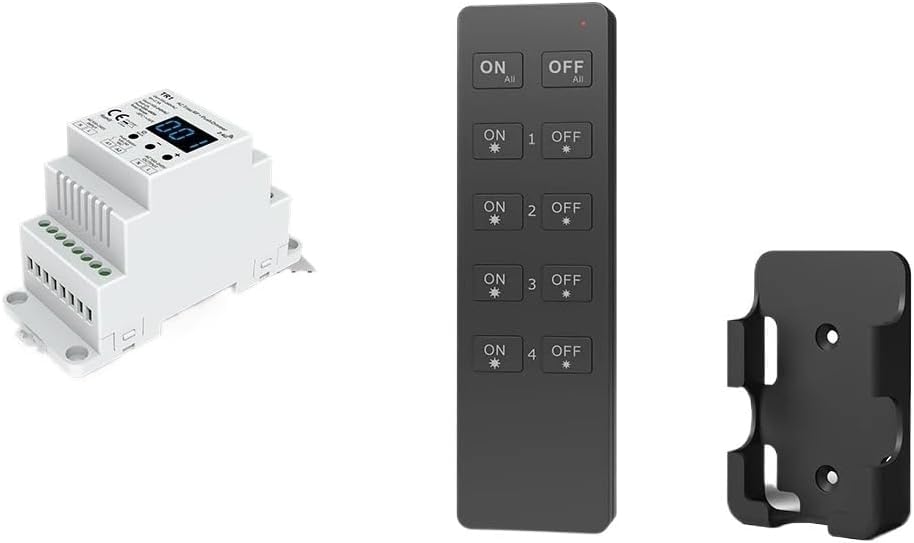
DimmersAC Triac LED Dimmer 220V 230V 110V Remote Control Dimming Button Switch Dimmer Switch LED Bulb TR1feature: + Push AC Phase Cut Dimmer, 1 Output.For dimming and switching monochromatic dimmable LED lamps, traditional incandescent lamps and halogen lamps.Digital digital display, brightness set via buttons.0-100% smooth dimming, no flicker.You can choose reverse phase dimming or positive phase dimming.Minimum brightness setting is 1% to 40%.Compatible with all Skydance single-zone or multi-zone dimming remote controls.Connect an external push button switch to achieve on/off and 0-100% dimming functions.How to match the remote control?Matching remote control:***match:Press and hold the matching button for 2 seconds, "RLS" will be displayed, press the power button within 5 seconds (single zone remote control)Or the zone key of the remote control (multi-zone remote control), "RLO" is displayed, and the matching is successful.***delete:Press and hold the Match button for 5 seconds until "RLE" is displayed.Delete all matching remote controls.What types of lights are compatible with it?Dimmable LED lights, maximum load 300W @ 220V, 150W @ 110V, due to the variety of LED light designs, the maximum number of LED lightsFurther depends on the power factor results when connected to a dimmer.Triac dimmable LED driver, maximum load 300W @ 220V, 150W @ 110V, the maximum allowed driver quantity is 200W divided by the driver nameplate rated power, and ensure that the surge current does not exceed 2 times 65A.Incandescent and high voltage halogen lamps, maximum load 500W @ 220V, 250W @ 110V.(Receiver) Specifications:Product name: AC bidirectional thyristor radio frequency + push dimmerReceiver: AST-TR1Input voltage: AC 100-240VOutput voltage: AC 100-240VWorking temperature: -20-60℃Output current: 1CH, 2AMaximum output power: 200-480WDimming level: 100 levels remote control frequency: MHz remote control distance: 30MColor: white bodyOne TR1 can be controlled by up to 10 remote controls.Synchronous and independent control1. All receivers work simultaneously in the same area.Automatic transmission: One receiver can transmit the remote control signal to another receiver within 30m. As long as there is a receiver within 30m, the remote control distance can be unlimited.Automatic synchronization: Multiple receivers within 30m distance can work synchronously under the control of the same remote control.Receiver placement provides communication distance up to 30m. Metals and other metallic materials narrow the range.Strong signal sources such as routers and microwave ovens will affect the range.For indoor applications, we recommend that the receiver should be placed no more than 15m apart.2. Multi-region, different regions work independently.Each receiver(s) is located in a different zone, such as zone 1, 2, 3 or 4.System parameter :Minimum brightness: Short press the - or + key to set the minimum brightness from 1% to 40% ("b01" to "b40"). You need to set a suitable minimum brightness to avoid flickering.Automatic black screen: Short press the - or + key to switch between enabling ("bon") or disabling ("boF") automatic black screen.Press and hold the M key for 2 seconds or time out for 10 seconds to exit the system parameter setting.Restore factory default parameters:Press and hold the - and + keys for 2 seconds to restore the factory default parameters and display "RES".Factory default parameters: 100% brightness, inversion control, minimum brightness 5%, disable automatic black screen.Dimming via 3 buttonsShort press the "Power" button to turn the light on or off.When the percentage brightness value (001~100) is displayed, the light turns on.When "bon" is displayed, the light goes out.When the light is on, press the - or + key to change the brightness, and press and hold for continuous adjustment.Dimming via push button switch:The AC Push-Dim interface provided allows for a simple dimming method using commercially available non-latching (momentary) wall switches.dog:Turn lights on or off.Long press (1-6 seconds):Press and hold for stepless dimming. Every time you press and hold, the light brightness will move in the opposite direction.Dimming memory:When turned off and on again, the lights will return to their previous dimming level, even in the event of a power outage.Synchronize:If multiple dimmers are connected to the same push button switch and long pressed for more than 10 seconds, the system is synchronized and all lights in the group are dimmed to 100%. This means there is no need for any additional synchronization wires in larger installations. We recommend that the number of dimmers connected to a push button switch should not exceed 25, and the maximum length of wire from the button to the dimmer should not exceed 20 meters.
- Dimmers
| Brand | GLOUPECT |
|---|---|
| Color | TR1 and R11 set |
| Material | ABS |
| Item Weight | 5.9 ounces |
| Part Number | GLOUPECT |
| Manufacturer | GLOUPECT |
| Assembled Width | 11 centimeters |
| Assembled Height | 11 centimeters |
| Assembled Length | 11 centimeters |
| Item model number | GLOUPECT |
| Batteries Required | No |
| Product Dimensions | 4.33 x 4.33 x 4.33 inches |
| Item Package Quantity | 1 |






Bestseller ranking
Dimmers


Customers who viewed this product also viewed
Skins


Correction of product information
If you notice any omissions or errors in the product information on this page, please use the correction request form below.
Correction Request Form